OpenClaw Skill Ready for ClawHub

Give your OpenClaw agent virtual try-on superpowers

Drop a single SKILL.md into your OpenClaw workspace and your AI agent can swap outfits on any photo — from either a garment image or a text prompt. Works across WhatsApp, Telegram, Discord, and Claude Code. Powered by the Looksy Clothes Swap API — 2 credits per call, flat pricing.

🐾 ClawHub-compatible 📄 MIT licensed 30s results
~/openclaw
# 1. Install the skill $ clawhub install looksy-clothes-swap Downloaded SKILL.md (2.1 KB) Registered under workspace skills Ready to use in next session # 2. Set your Looksy API key $ export LOOKSY_API_KEY="sk_live_xxxxxx" # 3a. Image mode — photo of person + photo of garment > try this dress on her [person.jpg] [dress.jpg] mode=image, 2 credits used · result ready # 3b. Prompt mode — photo of person + text description > put her in a red floral summer dress [person.jpg] mode=prompt, 2 credits used · result ready
What this skill does

Virtual try-on, made portable for any AI agent

OpenClaw skills are channel-agnostic — install once, use everywhere your agent lives.

🖼️

Image-to-image mode

User sends a person photo + a garment photo → agent generates a try-on in ~30s. Best when the exact outfit image exists.

💬

Image-to-prompt mode

User sends a person photo + describes the outfit in words ("red floral summer dress") → same 30s result. Best for chat-first UX.

🔑

API-key aware

Skill prompts the user to set LOOKSY_API_KEY and handles 401 / 402 gracefully.

💰

Same 2 credits per call

Both modes cost the same. Failed calls never charge. Your agent reports usage after each run.

Install in 3 minutes

From download to first try-on

The skill ships as a single SKILL.md — no binaries, no Docker, no hidden dependencies.

1

Download the SKILL.md

Save the manifest into your OpenClaw workspace skills folder, or drop it into any ClawHub-compatible agent.

2

Drop it into your skills folder

Most OpenClaw setups resolve skills in this priority order: workspace → managed → bundled. Put it in ~/.openclaw/skills/looksy-clothes-swap/ so you have full control.

~/.openclaw/skills/
# option A: manual
mkdir -p ~/.openclaw/skills/looksy-clothes-swap
mv ~/Downloads/SKILL.md ~/.openclaw/skills/looksy-clothes-swap/

# option B: clawhub
clawhub install looksy-clothes-swap
3

Set your API key

Export LOOKSY_API_KEY in the environment your OpenClaw process sees. Keys live on the Monthly or Yearly plan — the Weekly plan does not include API access.

.env
LOOKSY_API_KEY=sk_live_xxxxxxxxxxxxxxxx
4

Restart and talk to your agent

Start a fresh OpenClaw session so the new skill loads. Then just describe what you want — the agent will discover the skill automatically.

agent prompt
# Any of these phrasings trigger the skill
# Mode A — image-to-image (with garment photo)
> try this saree on her     [person.jpg] [saree.jpg]
> swap his shirt for this  [person.jpg] [shirt.jpg]

# Mode B — image-to-prompt (described in words)
> put her in a red floral summer dress     [person.jpg]
> show me in a navy blazer with jeans      [me.jpg]
> make her wear a black cocktail dress     [user.png]
What's inside

SKILL.md — YAML frontmatter + Markdown body

Standard format. Works in OpenClaw, ClawHub, and Claude Code. Here's the header and opening instructions.

.md

looksy-clothes-swap / SKILL.md

v1.1.0 · MIT · ~11 KB · 2 modes
⬇ Download
---
name: looksy-clothes-swap
description: Generate photorealistic virtual try-on
  images by swapping outfits onto any person photo using the
  Looksy AI Clothes Swap API. Supports two modes —
  image-to-image (person + garment photo) and
  image-to-prompt (person + text description)...
license: MIT
version: 1.1.0
homepage: https://looksyai.in/openclaw/clothes-swap
source: https://looksyai.in/api/clothes-swap
---

# Looksy Clothes Swap Skill for OpenClaw

## Two modes (both cost 2 credits)

### Mode A — image-to-image
person_image_url + clothing_image_url
Use when the user sent a photo of the garment.

### Mode B — image-to-prompt
person_image_url + prompt
Use when the user described the outfit in words.
Example: "red floral summer dress with white sneakers".

## When to trigger this skill

- "Try this [dress / saree / bikini] on me"
- "Put her in a [red dress / blue blazer / suit]"
- "Swap / change / replace the clothes in this photo"
- "Show me wearing this [outfit from URL]"
- "Virtual try-on", "outfit changer", "see myself"

## Authentication

- LOOKSY_API_KEY — required. Obtain from the user's
  **Looksy Monthly or Yearly** plan dashboard.
...

Full file covers intents, error codes, rate limits, async mode, safety policy, and attribution.

Live example

What a session looks like

Here's what happens after you install the skill and your user asks for a try-on.

OpenClaw agent · looksy-clothes-swap loaded
Can you try this dress on her? 👗
[person.jpg] [dress.jpg]
On it! Calling image-to-image mode.
mode: image-to-image
POST /v1/clothes-swap { person_image_url, clothing_image_url }
status: COMPLETED · 27.4s · credits_charged: 2
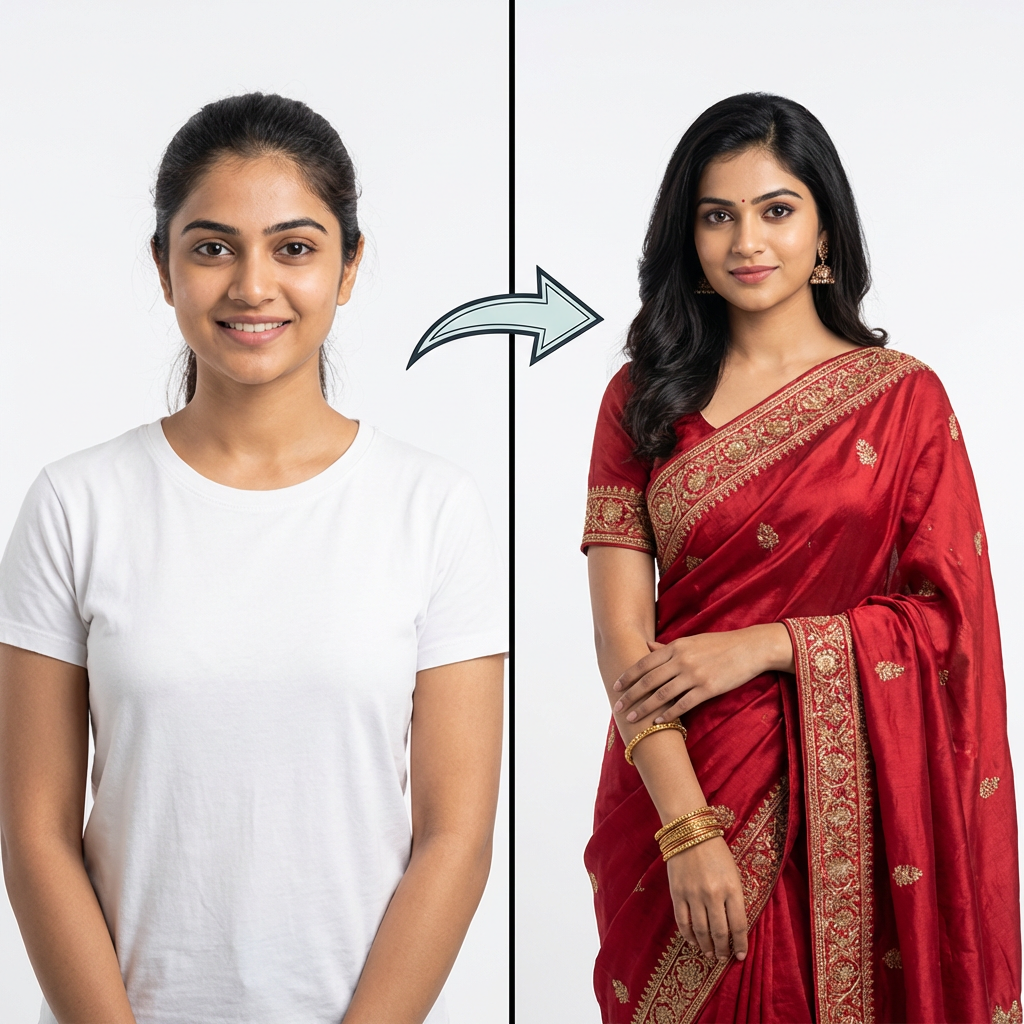
Here's the result ✨ Example virtual try-on result generated via the Looksy Clothes Swap OpenClaw skill — American woman wearing a sage-green floral summer dress.
2 credits used · 98 remaining on your Monthly plan
Now put her in a red floral saree instead
Switching to image-to-prompt mode.
mode: image-to-prompt
POST /v1/clothes-swap { person_image_url, prompt: "red floral saree" }
status: COMPLETED · 29.1s · credits_charged: 2
Result ready ✨ — same person, red floral saree. 2 more credits used.
Works everywhere

One skill, every OpenClaw channel

Skills live above the channel — install once, ship to all your surfaces at the same time.

💬

WhatsApp & Telegram

Give your bot instant virtual try-on. Users send two photos, get a result back in the same chat.

🎮

Discord & Slack

Run a styling channel where community members can drop outfits and see them on model references.

🧑‍💻

Claude Code & CLI

Developers building agents can call the same skill directly from Claude Code or any OpenClaw-compatible runtime.

Questions?

Clothes Swap for OpenClaw — FAQ

What is OpenClaw and where does this skill fit?

OpenClaw is an open-source gateway for AI agents. Skills are modular capability add-ons described in a SKILL.md file — install one and your agent learns a new ability, available across every channel OpenClaw connects to (WhatsApp, Telegram, Discord, Slack, Claude Code). This skill adds virtual try-on.

How do I install this skill?

Download the SKILL.md from this page, drop it in ~/.openclaw/skills/looksy-clothes-swap/ (or run clawhub install looksy-clothes-swap), export LOOKSY_API_KEY, then restart your OpenClaw session.

What's the difference between image-to-image and image-to-prompt mode?

Image-to-image sends clothing_image_url — best when the user or your app already has a photo of the exact outfit (product shot, supplier image, flat-lay). Image-to-prompt sends prompt — best for chat-first UX where users describe the outfit in words like "red floral summer dress". Both cost the same 2 credits and produce the same photorealistic result. The skill picks the right mode automatically based on whether the user sent a garment image or just text.

Is it compatible with Claude Code skills?

Yes. The SKILL.md format (YAML frontmatter + Markdown body with name and description fields) is the same across OpenClaw, ClawHub, and Claude Code, so the same file works in all three without modification.

What does the skill actually cost to run?

The skill is free (MIT licensed). The underlying Looksy Clothes Swap API costs 2 credits per successful request, drawn from your Monthly or Yearly plan. Failed calls (auth errors, safety blocks, unreadable input) never charge credits.

Which plans include API access?

Only the Monthly ($9.99/mo) and Yearly ($89.99/yr) plans include API access. The Weekly plan is app-only. Upgrade from the Looksy dashboard to receive an API key.

Can the skill handle WhatsApp media messages?

Yes. The skill expects public URLs for person_image_url and clothing_image_url — your OpenClaw connector should upload WhatsApp attachments to your media host and pass the resulting URL.

What happens if the user sends a blocked image?

The API returns HTTP 403 with content_blocked. The skill instructs the agent to apologize politely and ask for a different image. No credits are charged.

How do I update the skill later?

Re-download the latest SKILL.md from this page (or run clawhub update looksy-clothes-swap). Version metadata in the frontmatter helps OpenClaw detect changes.

Can I customize or fork it?

Yes — it's MIT-licensed. Fork the SKILL.md, tweak the instructions for your brand voice or locale, and re-publish. You can also add bonus sections (e.g. region-specific outfit templates).

Where's the full API reference?

See looksyai.in/api/clothes-swap — the SKILL.md links to it and your agent will follow those pointers when the user asks for documentation.

Ship in 3 minutes

Download the SKILL.md and empower your agent today

One file. MIT license. Works in every OpenClaw channel. Pay only for what your users actually try on — 2 credits per call on the Monthly or Yearly plan.